
Slow it down. Hear it instantly.
Y2K Player is a music player for iPhone and iPad that slows songs down, speeds them up, and changes their key while they play.
It works on the audio files you already own, and you hear every change as you make it. Nothing renders first. Nothing uploads.
- Free
- No ads
- No account
- Works offline



Where most people start
One tap, then move it anywhere.
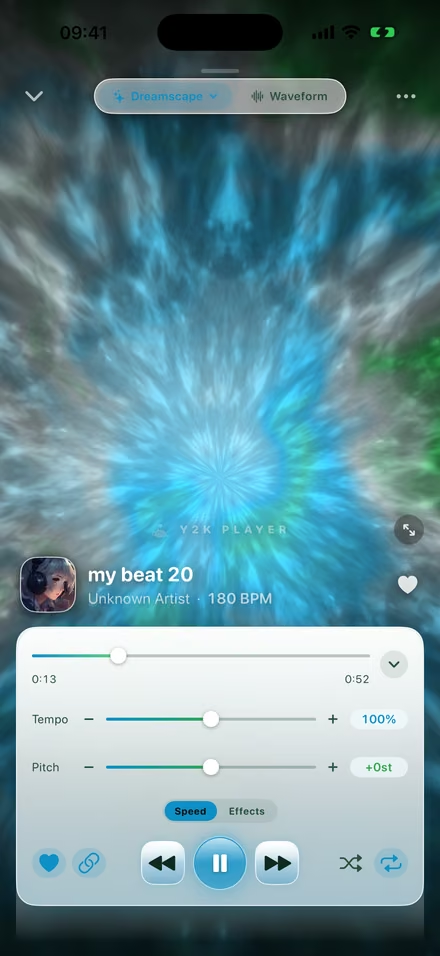
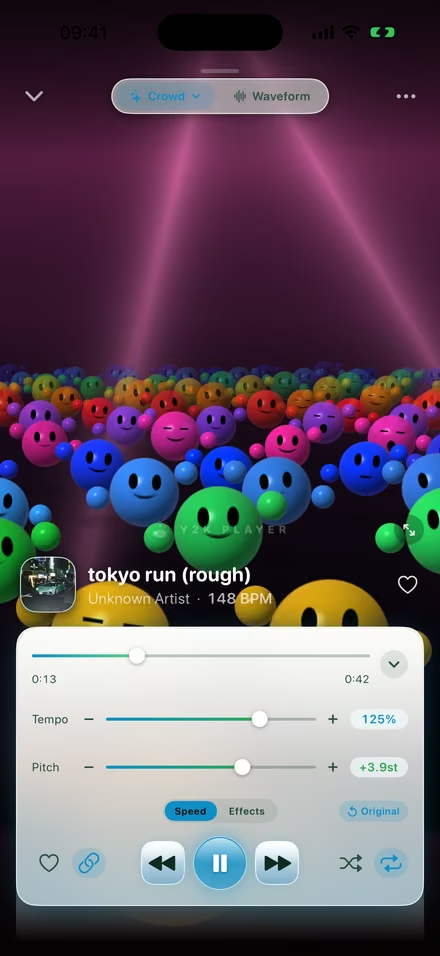
One tap gives you slowed + reverb, sped up or nightcore. A preset is a starting point, not a filter: every slider stays live underneath it.

Slow a song down. Speed one up. Move its key.
You hear every change on the track that is already playing, so you never wait on a render to find out how it sounds.
The effect rack
Six rooms, five bands, one chop.
Reverb with six rooms. A five band EQ with a real low shelf, so a bass boost is an actual bass boost and not a volume trick. Wide stereo, distortion, bitcrusher, flanger, and a chop locked to the beat by real BPM detection.
Every effect stacks on the same song at once, and you hear all of it live. Nothing is committed until you export.

Straight to the feed
Post the whole song, not a clip.
Skip the editing app and export the video from here. Full length rather than a thirty second clip, rendered on the device, in the shape the platform wants: tall for shorts and stories, wide for YouTube.
Put your own image behind it, the song's artwork, or a music visualizer moving to the audio. Or build the audio first, take a clean M4A or WAV straight into Files, and bring it to any editor you already use. Audio exports are never watermarked, at any tier.
With a still image behind it there is almost nothing to render, so the export is mostly just the encode and it finishes in seconds. An editing app has to composite and render the whole timeline before it can start writing the file, which is where the minutes go.


Visualizers
Scenes drawn from whatever is playing.
The app has a lot of music visualizers, and they are drawn live from whatever is playing rather than looped from a file. Swap them mid song. Turn the phone sideways for the widescreen version. They run offline like everything else.


Themes
Themes that change the entire app.
There are a lot of themes here, and picking one changes everything: the library, the player, the waveform, the sliders, down to the corner radius. It is not a colour filter sitting on one screen.
Candybar phones with backlit green LCDs. Flip phones in brushed silver, with the blue glow those had. Console dashboards you grew up switching on. Frutiger Aero glass, Y2K chrome, vaporwave, kawaii, retro desktops. Every screenshot below is the same app.
Your music, your device
No account. No servers. No connection.
An offline music player for local files. Import from Files, from a share sheet, or by pulling the audio out of a video. Plays MP3, M4A, AAC, WAV, AIFF and FLAC.
There is no sign in screen anywhere in the app, no analytics, no tracking and no crash telemetry. Nothing leaves your device, which is why the whole app works in airplane mode.

Free, and Pro
Free stays free. Pro is once.
Speed and pitch are free and always will be. Pro adds the effect rack and the rest of the themes and visualizers. It is a single payment: it never renews, and it never switches anything off later.
Free
No ads, no account, no time limit.
- Speed and pitch, live on the playing track
- One-tap slowed + reverb, sped up and nightcore
- Full-length video export, with a small watermark
- Audio export, never watermarked
- Themes and visualizers to start with
Pro
One payment. Forever.
- Everything in Free
- The whole effect rack: reverb, EQ, wide stereo, distortion, bitcrusher, flanger, chop
- The rest of the themes
- The rest of the visualizers
- Video export with no watermark
A Pro theme or visualizer unlocks and starts a seventy two hour window.
The app tells you the window has started, and when it ends, at the start.
It closes. Nothing you paid for is ever switched off, because Pro does not renew.
What people say
Five stars, in their words.
Amazing
Amazing music app. Allows me to experiment with my beats by speeding up / slowing them down. With the benefit of the nostalgic visualizer. A+ app
Best visualiser for your beats
Amazing app for you to play your beats, change the pitch and speed and no ads! For free too!
Fire!
very dope app with a cool visualizer and audio effects, even has an easy export option
lovely music player
clean and uncomplicated design, very fun to play around with
amazing
love it the kawaii theme is super cute
Questions people ask
How do I slow down a song and add reverb on an iPhone?
Import the file, pick the slowed + reverb preset, then move the speed and the reverb until it sounds right. Every change is heard on the track that is already playing, so nothing renders before you can judge it.
How do I speed up a song without the pitch going up?
Unlink speed from pitch, then move the speed on its own. By default the two are linked like a record, so speeding up raises the key; unlinked, the tempo moves and the key stays where it was.
What app makes nightcore?
Y2K Player has a nightcore preset that raises speed and pitch together in one tap, and every slider stays live underneath so you can keep adjusting from there. It works on audio files you already own, on iPhone and iPad.
How do I change a song's key without changing the tempo?
Unlink pitch from speed and move the pitch on its own, in semitones. This is what people use to bring a song into their singing range or to match another track, and the tempo is untouched.
Can I use songs from Spotify or Apple Music?
No, and no app can. Downloads inside a streaming app are protected and cannot be read by anything else. Y2K Player works on audio files you own outright, imported from Files, from a share sheet, or pulled out of a video.
How do I bass boost a song on iPhone?
Turn on the EQ and lift the low shelf. It is a real five band equaliser rather than a volume boost, so the low end comes up without the whole track getting louder or clipping.
How do I make a slowed and reverb video for TikTok or YouTube?
Build the sound first, then export the video from the same app. It renders on the device at the full length of the song, tall for shorts and stories or wide for YouTube, with your own image, the artwork, or a visualizer behind it.
Does it work without an internet connection?
All of it. Playback, editing, the effects, the visualizers and every export run on the device. There is no sign in screen anywhere in the app and nothing is uploaded, which is why it all works in airplane mode.
Do you need a subscription?
No. Speed and pitch are free and always will be. Pro adds the effect rack and the rest of the themes and visualizers as a single payment that never renews and never switches anything off later.
How long can the exported video be?
The length of the song. There is no thirty second cap, including on the free tier. Free video exports carry a small watermark; audio exports are never watermarked at any tier.