
Pitch shifting · iPhone & iPad
Change the pitch.
Leave the tempo alone.
Semitone steps in both directions, heard as you drag, on the songs already on your phone.
The pitch slider is free. No account, nothing uploaded.
- Two octavesup or down from where it sits
- Fine stepsfor landing on a voice
- Tempo untouchedonly the key moves
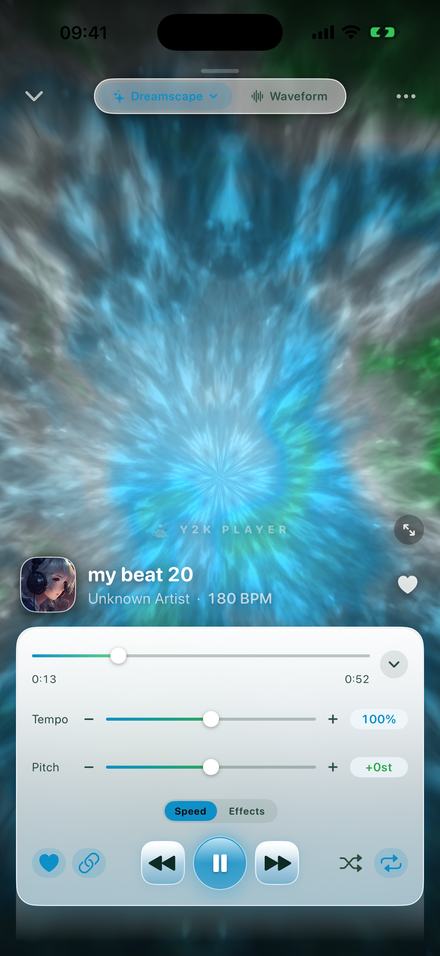
Semitones, keys, and what ±12 means
A semitone is the smallest step in Western music: one fret on a guitar, one key on a piano counting the black ones. Twelve of them make an octave, which is why the range here runs from −12 to +12 — a full octave in either direction.
Moving a song by a semitone moves it into the next key. Two semitones is a whole tone. If a song is in G and you need it in A, that is +2. If it is in A and you need G, that is −2. You do not have to know the key you are starting from to use this, which is the practical point: you move it until it feels right and read the number off afterwards.
| Steps | Interval | Typical use |
|---|---|---|
| −1 or −2 | Semitone / whole tone down | The chorus sits just above your range and you keep straining at it |
| −3 | Minor third down | A song written for a higher voice type, brought into reach |
| −5 / +7 | Fourth down / fifth up | The two most common transposition distances in a band setting |
| +1 or +2 | Semitone / whole tone up | The verse sits under your floor and sounds gutless |
| ±12 | A full octave | Not usually musical on a full mix, but it is the honest edge of the range |
Why the tempo has to be unlinked
By default this app ties pitch to tempo, because a slowed or sped up edit needs them to move together. That is the wrong behaviour for changing a key, where the whole point is that the song stays exactly as long and exactly as fast as it was. Turning the link off separates them: the tempo readout stays at 100% and the pitch becomes a control of its own.
How to do it
Under a minute, and you can be singing over it while you set it.
- Add the songTap Add and choose the file, or share it into the app. Backing tracks, karaoke versions and full recordings all behave the same way.
- Unlink pitch from tempoTap the chain button beside the transport. With the link on, pitch and tempo move together; with it off, the pitch slider is its own control and the tempo stays at 100%.
- Move it a semitone at a timeThe buttons either side of the Pitch slider step in whole semitones — the same distance as one fret, or one key on a piano including the black ones. The readout shows exactly where you are.
- Sing over itPlayback never stops while you drag, so you can hold a note and move the track until it sits under you rather than guessing and re-rendering.
- Fine-tune if you need toSwitch on fine control steps in Settings and the slider moves in quarter-semitones, for the cases where a whole semitone is one step too far — a recording that was not quite at concert pitch to begin with, usually.
- Leave it thereThe key is stored with that song, so it plays in your key from now on without being set again. Export writes it into an M4A or a WAV.
Set it while you are singing, not before
Finding the right key is a judgement your voice makes, not one you can make from a number. So the number changes while the song plays.
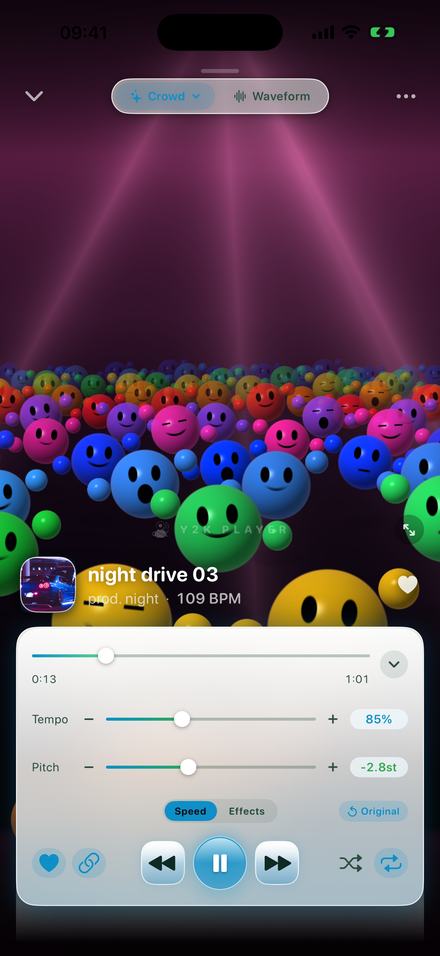
The readouts are the whole interface
Both values are printed in full at all times, so you always know exactly where a song sits rather than reading a slider position. The example above is the linked behaviour — 85% dragging the pitch down to −2.8 — which is what you get with the chain on. Unlink it and the two numbers stop following each other.
The Original button beside the tabs puts the song back to how it was recorded, immediately, so experimenting costs nothing.
Because the key is stored with the song, a karaoke track set to −3 is at −3 next Friday too, and every other track in the library is untouched.
What a pitch shifter can and cannot do
Moving pitch without moving time means the audio has to be rebuilt: the recording is resampled to the new pitch and then stretched back to its original length. Done in real time on a phone, that is impressive and it is not invisible.
Small moves are clean. One to three semitones on most material is transparent enough that a listener would not identify it as processing.
Large moves colour the sound. Past about five semitones, and especially upwards, voices start to take on a glassy quality and cymbals get a metallic edge. That is inherent to the technique, not a setting.
Sparse beats dense. A voice and a guitar shifts further than a loud, compressed full mix does, because there is less overlapping material for the algorithm to smear together.
It cannot separate parts. The whole recording moves. There is no way to transpose the vocal and leave the band, because there is only one signal.
Four things people actually do with this
Karaoke that sits where your voice does
Most karaoke tracks are cut in the key the original singer used, which is frequently not your key. Two semitones down turns a chorus you were shouting into one you can hold. Because the setting is stored with the track, the version you sing is the version that plays the next time — you set it once and it stays set.
Learning a cover in your own key
Working out a song by ear is much faster when the recording is already in the key you intend to play it in, because what you hear and what you finger are the same thing. Move the recording first, then learn it; you skip the transposition entirely.
Matching a recording to an instrument that is not at concert pitch
A guitar tuned a semitone flat, a piano that has drifted, a horn that plays in a different key from the page — all of these are one semitone move away from being usable with a recording, instead of a re-tune or a re-transcription.
Warming up in stages
Take a piece three semitones below where it sits, sing it comfortably, then step it up one semitone at a time until you are at pitch. The step buttons move in whole semitones, so the ladder is four taps rather than four decisions.
One combination worth knowing: the pitch and tempo controls are independent once you unlink them, so a track can be at −2 semitones and at 85% speed at the same time. That is a rehearsal setting rather than a listening one, and it is the fastest way to learn something that is both too fast and too high. Slowing down without moving the key is covered on its own page.
Before you install anything
- The pitch slider is free and so is the tempo slider. Nothing on this page is behind a payment.
- Range is −12 to +12 semitones, a whole semitone per step. Switch fine control steps on in Settings and the slider moves in quarter-semitones instead.
- Free audio export writes the first 30 seconds of the retuned song; Pro writes all of it. Playing it in your key costs nothing either way.
- No key detection. The app shows the BPM it detected but it does not tell you what key a song is in, so the number you set is relative to where it started.
- Music inside a streaming subscription cannot be imported. Backing tracks have to be files you own.
Questions about changing the key
For singers, players and anyone who has ever been half a step out.
Can I change a song's key without changing its speed?
Yes. Turn the pitch link off and the pitch slider becomes its own control; the tempo stays at 100% no matter how far you move it.
How far can it transpose?
Twelve semitones in each direction, which is a full octave either way.
Can I move it by less than a semitone?
Yes, once fine control steps are switched on in Settings — the slider then moves in quarter-semitones instead of whole ones. That is mostly useful for old recordings that were never quite at concert pitch to begin with.
Is it good enough for karaoke?
For the one to four semitones most people need, yes — and you can set it while singing rather than guessing. Beyond about five semitones the processing starts to be audible.
Does it change the tempo at all?
Not with the link off. The song lasts exactly as long as it did.
Can it transpose only the vocal?
No. There is one audio signal and all of it moves together. Separating a vocal from a mix is a different kind of tool entirely.
Will the retuned version be saved?
The setting is stored with the song, so it always plays in your key. To get a file out, export it as M4A or WAV with the pitch rendered in.
Does it need internet?
No. Everything runs on the device, with no account and no server.
Does it tell me what key the song is in?
No. It shows the detected BPM but not the key, so the semitone number is a distance from wherever the recording started.
Can I do this to a backing track from a video?
Yes — import the video and the app extracts the audio for you.
Will it modify my original file?
No. The file is copied in once and only read afterwards.
Does it work on iPad?
Yes, on iPhone and iPad running iOS or iPadOS 18 or later.
Where to go next
Put the song where your voice already is.
Free to download and free to use. Pro is one payment for the effect rack and full-length exports.
Free to download and keep. Pro is a one-time purchase — buy it once and it never renews.