
Speed & pitch, linked · iPhone & iPad
Nightcore, on the songs
you already own.
The classic way, on your own files — full screen, with something moving behind it, and no connection needed.
The speed and pitch sliders are free. Pro is a one-time purchase that never renews.
- One tapand it is already playing
- Then move itnothing is locked afterwards
- Full screenlandscape, and swappable mid-song
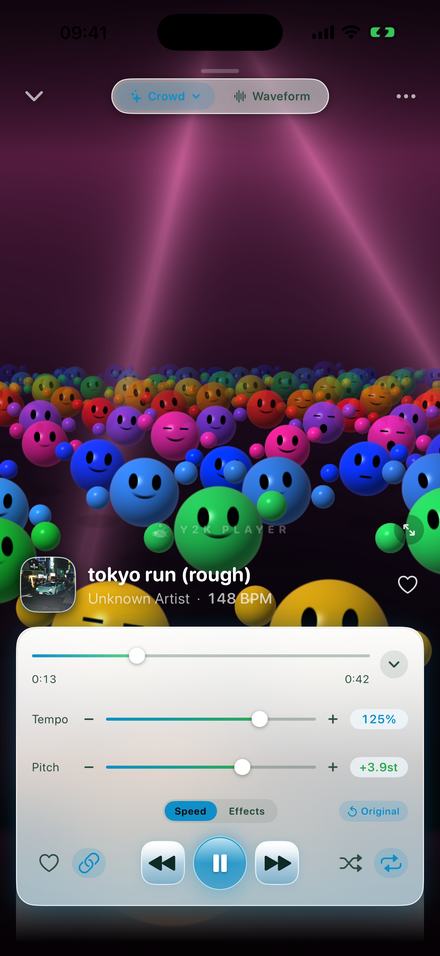
What makes a nightcore edit nightcore
Speed and pitch, raised together, by the same ratio. That is the entire mechanism, and it is why nightcore sounds like a different singer rather than like somebody pressing fast-forward.
If you only raise the tempo — time-stretching, holding the key — you get the same song, sooner. The voice is unchanged, the timbre is unchanged, and nothing about it reads as nightcore. What produces the sound is letting the pitch climb with the speed, the way a record does when the platter turns faster: every frequency in the recording is multiplied by the same number, so the vocal gets lighter and thinner and the whole track gains urgency.
In Y2K Player that behaviour is a switch, and it is on by default. With it on, the two sliders are one dial seen two ways — drag either and the other follows. Turn it off and you get the time-stretched version, which is useful for other things and is not this.
How high, exactly
The relationship is fixed: twelve semitones per doubling of speed. The numbers below are what the readout will show.
| Tempo | Pitch | Character |
|---|---|---|
| 125% | +3.9 st | The sped up range — bright, but the singer still sounds like themselves |
| 130% | +4.5 st | The bottom edge of nightcore |
| 135% | +5.2 st | The preset. Where most of the genre sits |
| 140% | +5.8 st | Pushing; works on sparse tracks, muddles busy ones |
| 150% | +7.0 st | A perfect fifth up. The high end of anything listenable |
| 200% | +12.0 st | A full octave, and the top of the range. A novelty rather than a version |
A tip that saves a lot of dragging: a track’s original BPM is printed under its title. A 148 BPM song at 135% is 200 BPM, which is fast enough that busy drum programming stops being separable. Slower source material takes the treatment better.
How to make it
Three minutes, and everything is audible while it is happening.
- Add the songTap Add and pick the file, or share it into the app from wherever it lives. The original is copied in and never modified.
- Check the link is onThe little chain button next to the transport is what ties pitch to tempo. On is the default, and on is what nightcore needs — the two have to move together or it is just a fast song.
- Push the tempo upDrag Tempo to about 135%. The pitch readout climbs with it, landing around +5.2 semitones. Anywhere from 125% to 150% is defensible; 135% is the preset.
- Or tap the presetOn the Effects tab there is a chip labelled Nightcore. It sets 1.35× and lifts the top of the EQ so the brightness sounds intended.
- Put something behind itTap the visualizer name at the top of the player to open the picker, choose a scene, and go full screen. Turn the phone sideways for the wide version.
- Export itAudio comes out as M4A or WAV. Export to video renders a full-length MP4 in 16:9, 9:16 or 4:3 with your artwork on it.
The half nobody builds: something to look at
Nightcore has never been an audio-only format. It is consumed as a picture with a song under it, which is exactly the part every browser tool leaves out.
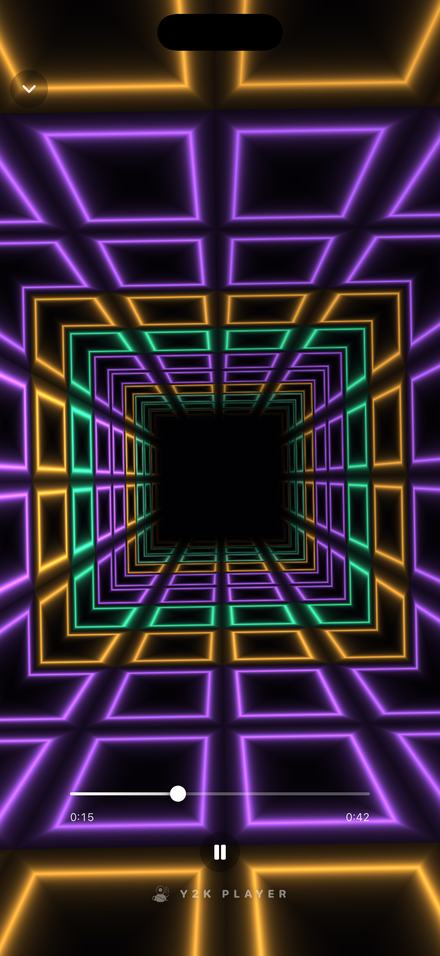
Full screen, and it is reacting to the actual song
These are rendered live from the audio that is playing — the low end drives one part of the scene, the highs another, and the beat is detected rather than guessed at from a fixed tempo. Speeding a track up to 135% changes what the picture does, because the picture is following the sound.
The look changes mid-song without stopping playback: open the picker, tap another scene, and it crossfades. There is also a rotation setting that deals a fresh look for every song, or swaps every 45 seconds while you are watching.
Turn the phone sideways and it fills the screen the other way, which is the shape most of this gets watched in.
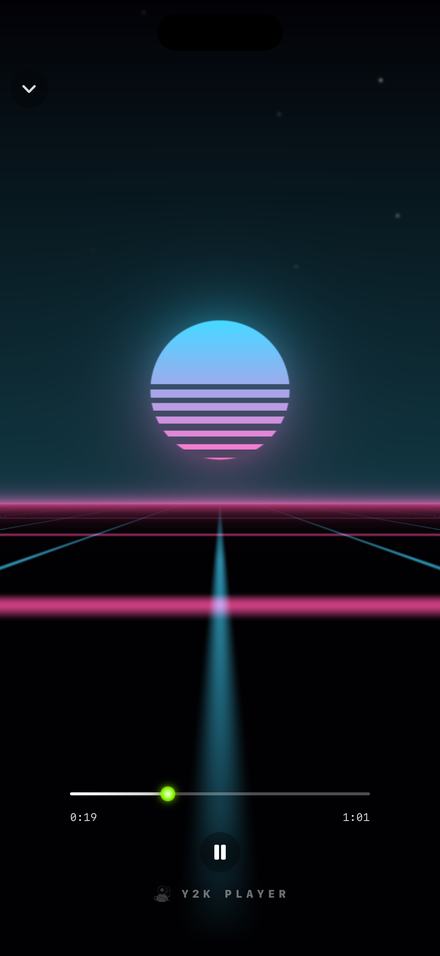
Colours that follow the app, or ignore it
Every scene can take its colours from the theme you are wearing, keep its own signature palette, or reroll into a new outfit each time you open the player. The scene above is in its classic colours.
There is an option to float the cover art over the visuals, so the artwork and the scene are on screen together — useful if you are recording the screen rather than exporting a file.
The whole set is on the visualizers page, at full size, with what each one does.
Getting it out of the phone
Two routes, and they answer different needs.
Audio. Export writes an M4A or a WAV with the speed and pitch rendered in, named after the song and the percentage. That is the file to hand to an editor, and it never carries a watermark. The free tier writes the song’s first 30 seconds; Pro writes all of it.
Video. The same sheet renders a full-length MP4 at 1080p in 16:9, 9:16 or 4:3, with your artwork centred over a blurred copy of itself — or over any picture, GIF or looping clip you choose. Free videos are full length with a small corner mark; Pro removes it. The details are on the video page.
One honest note: the visualizer is not filmed into the export. It runs on screen while you listen. If you want motion in the video, use an animated GIF or a short clip as the cover.
Daycore is the same dial, the other way
If nightcore is the tempo and pitch pushed up together, daycore is the two pulled down together — usually to somewhere between 0.70× and 0.80×, which puts the key four to six semitones below where it started. Slower, heavier, and the voice changes character just as audibly.
It uses exactly the same controls, so there is nothing new to learn. The numbers and the reverb that usually comes with it are on the slowed and reverb page.
Before you install anything
- Speed and pitch are free. Nightcore any song you own, keep it that way, play it forever, pay nothing.
- A set of visualizers is free and the rest are part of Pro, with a three-day window to try those. The effect rack is not in that window — it is Pro from the start. The app tells you when the window opens rather than after it ends.
- Free audio export writes the first 30 seconds. Video export is full length on both tiers, with a small corner mark on the free one.
- The visualizer is not rendered into the video. It plays on screen; the export shows your artwork.
- Music from a streaming subscription cannot be imported. Those downloads are locked to their own app. This works on files you own.
Questions about nightcore
Answered here, so nothing about this needs installing to find out.
What speed is nightcore?
Most of it lives between 125% and 150%, and 135% is the usual answer. The built-in preset uses 1.35×, which puts the pitch 5.2 semitones up.
Does nightcore raise the pitch as well as the speed?
Yes, and that is the definition. Speed and pitch move together by the same ratio, the way they do on a record played fast. If the pitch stays put you have a time-stretched song, not a nightcore edit.
How many semitones is nightcore?
It follows from the speed: twelve semitones per doubling. 125% is +3.9, 135% is +5.2, 150% is +7.0. There is a full table further up this page.
Can I make nightcore without an internet connection?
Yes. Everything — importing, speeding up, the visualizers and the export — runs on the device. There is no account and no server involved at any point.
Do I need to upload my song anywhere?
No. The file is copied into the app’s own storage on your phone and never leaves it.
What is the difference between nightcore and sped up?
The mechanism is the same; the amount and the intent differ. Sped up edits sit around 125% and try to keep the song recognisably itself. Nightcore goes further, to where the changed voice is the point. Sped up songs covers the lower half of the range.
What is daycore?
Nightcore inverted — speed and pitch pulled down together, usually to 0.70× to 0.80×. Same controls, opposite direction.
Can I export it as a video?
Yes, full length, at 1080p, in 16:9, 9:16 or 4:3. Free exports carry a small corner mark; Pro removes it.
Do the visualizers react to the song?
They are driven by the audio that is playing, including the detected beat — not by a canned animation. Change the speed and what you are watching changes with it.
Can I change the visualizer while a song is playing?
Yes. Open the picker, tap another one, and it crossfades without interrupting playback. It can also rotate automatically, per song or every 45 seconds.
Does it work on iPad?
Yes, iPhone and iPad, iOS and iPadOS 18 or later. Full screen and landscape both work.
Will it modify the original file?
No. Everything you change is stored as a setting attached to the song; the audio you imported is only ever read.
Where to go next
Nightcore the songs you already own.
Free to download and free to use on your whole library. No account, no upload, and it works with the wifi off.
Free to download and keep. Pro is a one-time purchase — buy it once and it never renews.