
Tempo & reverb · iPhone & iPad
Slowed and reverb,
on the songs you own.
One tap and it is already playing that way. Every change you make after that is audible while the song keeps playing.
Speed and pitch are free. The effect rack is what Pro buys.
- One tapslowed, with a room around it
- Six roomsAir through to Cathedral
- Still yoursevery slider stays live under it
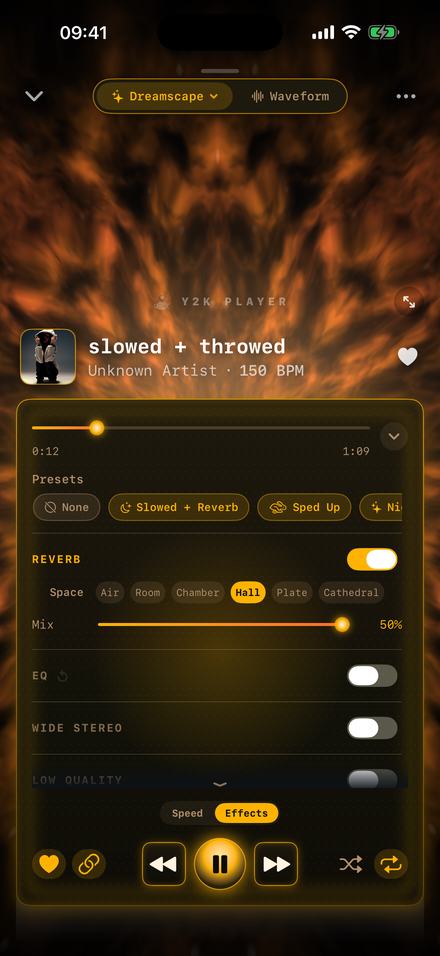
What slowed and reverb actually is
Two changes, made together. The song is slowed to roughly 80–90% of its recorded speed, and a reverb tail is added so it sounds like it is being played in a large, hard-walled room rather than out of a speaker.
The slowdown is the part people notice first, and it does more than change the tempo. If the pitch is allowed to follow the speed — the way it does on a turntable — the whole track also drops in key. That is why a slowed version sounds heavier and darker rather than simply later. At 85%, the drop is 2.8 semitones: a little under three keys down.
The reverb is what turns it from “a slow song” into the sound the genre is named after. A long tail smears the transients together, so the drums stop snapping and start booming, and the vocal sits further back. The exact room matters more than most tutorials admit, which is why the six spaces below are listed with the length of their tails.
How it is different from a time-stretch
There is a second way to slow a song: hold the pitch where it is and stretch the audio in time. That keeps the key intact and is the right tool for practising an instrument, but it does not sound like this. It sounds like the original song, played slower. If you want the darker, heavier version, the pitch has to come down with the tempo. Both are available here — the link between them is a switch — but the linked one is the default because it is what this sound is.
How to do it
Two minutes, and you hear every step of it while the song is playing.
- Bring the song inTap Add and pick the file, or share it into the app. It is copied into the app’s own storage and the original is left exactly as it was.
- Drop the tempoOn the player’s Speed tab, drag Tempo down. 85% is the standard. With the link on — it is on by default — the pitch falls with the tempo the way a record does when you slow the platter.
- Switch the reverb onMove to the Effects tab and turn Reverb on. The song does not stop; the room appears around it mid-bar.
- Pick the roomAir, Room, Chamber, Hall, Plate or Cathedral, left to right, shortest tail to longest. Hall is the one this sound is usually built on.
- Set the mixMix decides how much of the room you hear against the dry song. It stops at 50%, because past halfway the reverb stops sounding like a room and starts sounding like a fault.
- Keep it or export itThe settings stay attached to that song forever, so it simply plays that way from now on. Export writes an M4A or a WAV; Export to video renders an MP4.
The six rooms, and which one you want
Every space is a genuinely different room, not the same reverb at six strengths. The tails below were measured on a single click, on the device.
| Space | Tail | What it is for |
|---|---|---|
| Air | 0.35 s | Barely a room. Takes the dryness off a close-mic’d vocal without anyone noticing it is on. |
| Room | 0.95 s | The default. Tight and clean; colours the song without washing it out. |
| Chamber | 1.25 s | A touch longer and denser. Good on drums that need weight but not blur. |
| Hall | 2.95 s | The one this sound is built on. Long enough that the tail of one bar overlaps the next. |
| Plate | 7.1 s | Enormous and metallic. At any real mix level the song stops being a song. |
| Cathedral | Longer still | For when the point is the room and the song is the excuse. |
A useful rule: the faster the original song, the shorter the room. A 150 BPM track slowed to 85% is still 127 BPM, and a 2.95-second tail on top of that is four bars of overlap. On a 90 BPM track the same Hall sounds spacious; on a fast one it sounds like mud.
What the preset actually sets
Not a vibe. Four values, and every one of them is still a control you can move afterwards.
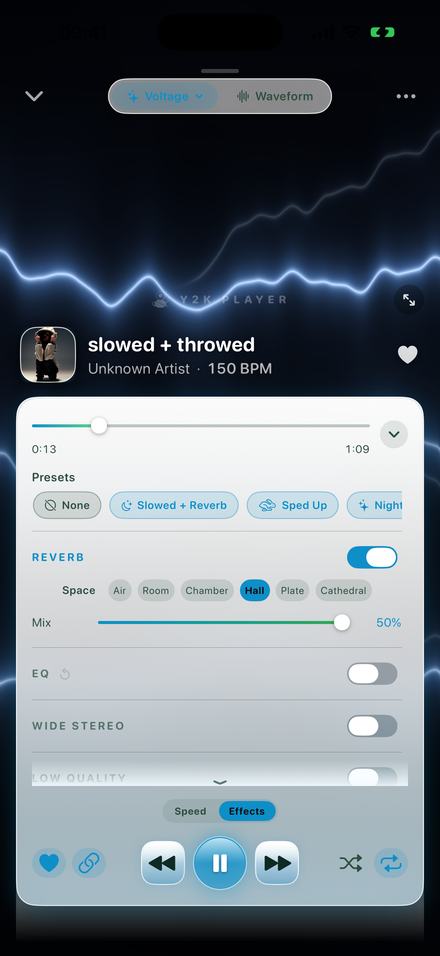
One tap, four values
Tempo 0.85×, with the pitch link on, which puts the key 2.8 semitones down. Reverb on at a mix of 34 out of 50. Wide Stereo on at 60, which pushes the sides of the mix outwards so the room feels bigger than the reverb alone makes it.
Everything else in the rack is cleared, so yesterday’s bitcrusher is not riding along underneath today’s slowed version. That is the entire reason presets start from a clean rack rather than adding to whatever was there.
The other presets are worth knowing about too: Sped Up sits at 1.25×, Nightcore at 1.35×, Chopped at 0.72× with beat-locked stutters, Rewound at 0.80× with the tape running backwards every couple of bars, and Dreamy at 0.88× with the reverb pushed to 44 and the stereo to 75.
Daycore is the same controls, further down
Daycore — anti-nightcore — is what happens when you keep going past the slowed and reverb range and let the pitch keep falling with the tempo.
There is no separate mode for it, because it is not a separate mechanism. Where slowed and reverb lives at 0.85×, daycore usually sits between 0.70× and 0.80×, and the point is that the voice audibly changes character rather than simply sounding relaxed. At 0.75× the pitch is nearly five semitones down; at 0.70× it is over six.
| Tempo | Pitch | Usually called |
|---|---|---|
| 0.92× | −1.4 st | Barely slowed — the lo-fi range |
| 0.88× | −2.2 st | Dreamy |
| 0.85× | −2.8 st | Slowed and reverb |
| 0.80× | −3.9 st | The deep end of slowed |
| 0.75× | −5.0 st | Daycore |
| 0.72× | −5.7 st | Chopped and screwed territory |
| 0.50× | −12.0 st | A full octave down |
The tempo slider covers 50% to 150%; the small buttons either side of it step past that in 5% increments, down to 25% and up to 200%. 25% is not a musical setting, but it is the honest bottom of the range.
Heard while it plays, not rendered and then heard
This is the one thing a page with a file-drop box cannot do, and it changes how you work.
Upload-and-render tools have a fixed shape: choose a file, choose a number, wait, listen, decide it is wrong, change the number, wait again. Every judgement you make is separated from the change that caused it by a progress bar.
Here the audio engine is running the whole time. Dragging Tempo moves the song under your finger. Turning Reverb on puts the room in mid-phrase. Switching from Hall to Plate happens between one beat and the next. You are listening to the decision, not to a rendering of it, which means you stop when it sounds right rather than when you have run out of patience.
And it remembers
The settings belong to the song, not to a session. Close the app, come back next week, play that track and it plays at 0.85× with the Hall on. A different song has its own settings. Nothing is a project you have to reopen, and the Original button puts any song back to how it was recorded in one tap.
Said plainly
- Tempo and pitch are free. You can slow any song you own, keep it slowed, and play it that way forever without paying anything.
- The effect rack is part of Pro — the reverb included. Pro is one payment, not a subscription, and the free player is not crippled to sell it.
- Free audio export writes the first 30 seconds. Pro exports the whole song. Video export is full length either way.
- There is no MP3 export, because iOS ships no MP3 encoder. M4A and WAV are what come out, and both are accepted everywhere an MP3 is.
- Audio exports are never watermarked. No tone, no voice, no tag — on any tier.
- Music inside a streaming subscription cannot be imported. Those downloads are locked to their own app. This works on files you own.
Questions about the sound
Answered here so you can decide before installing anything.
What tempo is a slowed and reverb song?
Usually between 80% and 90% of the original. The built-in preset uses 85%, which is where most of this genre sits. Below about 75% it stops sounding slowed and starts sounding like daycore, which is a related but distinctly different sound.
Does the pitch have to drop?
For this sound, yes — the darkness is the pitch, not the tempo. The link between them is on by default. You can switch it off, in which case the song slows and stays in the same key, which is what you want for practising rather than for listening.
Which reverb should I choose?
Hall for the classic version. Room if the song is fast and Hall turns it to mud. Plate and Cathedral are enormous and are better used at a low mix, as an atmosphere rather than an effect.
Why does the reverb mix stop at 50%?
Because past halfway the dry song is quieter than the room it is in, and everything turns to wash. Capping it there means every position on the slider is usable.
Can I make daycore with it?
Yes — it is the same two controls further down. 0.70× to 0.80× with the pitch link on is the range. There is a table of exactly where the pitch lands further up this page.
Does it change my original file?
Never. The audio you import is copied into the app’s storage and then only ever read. Speed, pitch and effects are stored as settings alongside it.
What can I export?
M4A or WAV for audio, MP4 for video. No MP3, because iOS has no MP3 encoder. Everything you hear — tempo, pitch, reverb, EQ — is rendered into the file.
Does it need internet?
No. There is no account, no server and no sync. It works in airplane mode.
Can I hear the change while the song is playing?
Yes, and that is the point of the design. Nothing is rendered before you can hear it; the sliders move the audio that is already coming out of the speaker.
Will it remember the settings for each song?
Yes. Each song keeps its own tempo, pitch and effect rack, and plays that way whenever you come back to it.
Can I slow down a video’s audio?
Yes. Import a video file and the app takes the audio out of it, after which it is a song like any other.
Is Pro a subscription?
The purchase people mean by Pro is one payment that never renews, and there is no account. A monthly plan exists for people who would rather not pay up front. What Pro adds spells out the split.
Where to go next
- Turn it into a videoThe cover art, the blurred background, and a full-length MP4.Open →
- Sped up songsThe same slider the other way, and what 125% does to the key.Open →
- Slow it down but keep the keyFor guitarists, dancers and anyone transcribing.Open →
- VisualizersWhat is moving behind the panel in every picture on this page.Open →
Try it on a song you already have.
The player is free, the tempo slider is free, and nothing needs an account. Pro is one payment if you want the rack.
Free to download and keep. Pro is a one-time purchase — buy it once and it never renews.